

When a vendor relationship ends, most teams focus on contracts and payments—but the real risk often hides in lingering IT access. A 2024 report by Mitratech found that 61% of companies have experienced a data breach caused by a third party.
That “third party” could be your vendor, or worse, someone exploiting your vendor’s compromised systems. Hertz is a great example—their customer data got leaked when the CL0P ransomware gang hacked Cleo, its file transfer provider.
A missed login, API key, or integration can leave a backdoor into your systems. This is where a vendor offboarding checklist comes in. By following a structured process, IT teams can close every access point, document compliance, and ensure a clean, secure exit when a vendor relationship ends.
TL;DR
- Poor vendor offboarding creates security risks, as vendors often retain admin access, API keys, and credentials across systems.
- Offboarding vendors is harder than employees because access spans multiple domains, shadow IT, and integrations outside identity providers, requiring IT, legal, finance, and procurement coordination.
- A vendor offboarding checklist should cover risk assessment, contract notification, access removal, data retrieval, financial closure, and post-offboarding monitoring.
- Document every step for compliance and audit readiness, as disputes and reviews often occur long after termination.
- Automate 100% of app deprovisioning—even for apps without SCIM—by using Stitchflow’s resilient browser automation. This closes the "last mile" automation gap that IdPs can't cover.
The hidden risks of poor vendor offboarding
Vendor offboarding is one of the most important steps IT teams can take to reduce risk and stay audit-ready, because offboarding mistakes can cut across every part of the business—security, finance, and operations. Done right, it keeps you audit-ready and covers every aspect of the business—from security to finances to day-to-day operations.
Security risks
When vendors aren’t offboarded properly, they leave behind hidden security gaps that IT teams often overlook. Unlike employees, they often worked with broad admin credentials, undocumented service accounts, and shadow IT setups, making it tough to fully revoke access once the relationship ends.
Data is another blind spot: vendors may still contain data—usually in less secure environments— with longer retention periods. This might include sensitive details like SSL certificates, signing keys, or encryption materials that authenticate your services.
If these aren’t revoked, they can be used for impersonation or code-signing attacks. And you won’t know about it until after the fact—sometimes months later. For example, while the telehealth vendor, Kokumo Solutions, was hacked on December 11, 2024, they didn’t inform their clients until eight months later.
⚠️Supply chain attacks increasingly start with small vendors. Attackers see them as practical entry points into larger ecosystems—precisely because they often have privileged access but fewer security resources. This makes thorough vendor offboarding just as important with smaller partners as with large ones.
Financial risks
Poor vendor offboarding doesn’t always cause a crisis, but it almost always ends up costing more than teams expect. The real costs come from:
- You end up paying premium rates for contractors or new tools when you need immediate support
- You lose vendor-specific support and knowledge, slowing down daily operations and delaying projects
- You adopt unapproved tools to fill gaps—creating future compliance and integration costs
These might not be catastrophic—like Morgan Stanley paying $60 million in fines five years later for lack of vendor oversight—but often add up to 30–70% more than the original cost of the vendor relationship.
And that’s without layering on regulatory fines from mishandled data deletion or disrupted audit trails.
Legal risks
Poor vendor offboarding often leads to legal disputes—especially around intellectual property, data ownership, and termination terms when contracts weren’t reviewed carefully up front. Data breaches can create even bigger liabilities.
‼️The Lexington Medical Center case shows how liability lingers even after a vendor relationship ends. In 2021, archived patient data left on former vendor Healthgrades’ systems was breached, exposing Social Security numbers and medical records. Lexington had already moved on from Healthgrades, but still faced notification costs, credit monitoring expenses, and potential liability.
Industries like healthcare and finance face extra pressure since vendor systems often hold audit trails required by HIPAA, SOX, and other regulations.
Why vendor offboarding is more complex than employee offboarding
When an employee leaves, IT can shut down a single account and be done. Vendors are different. Their access and data are spread out in ways that don’t cleanly turn off.
- Limited visibility into vendor access: Vendors don’t use the same onboarding paths as employees. They get in through system integrations, shared accounts, API keys buried in apps, and tools adopted without IT approval.
- Data exists in multiple domains: Employee data stays in your systems. Vendor data doesn’t. It is in their tools, sandboxes, ticketing systems, or backups. Turning off their access to your systems doesn’t remove what they already hold. Their retention policies control that.
- Many teams are involved: Employee offboarding usually flows between HR and IT. Vendor offboarding cuts across legal, procurement, finance, and business units. Each group runs on its own timeline, so coordination is slow and messy.
- Multi-domain and exception-heavy accounts: Vendors rarely log in through your corporate IDP. They use personal emails, alternate domains, or special-purpose accounts (e.g., marketing-consultant@acme.com). Because these apps aren't connected to your IdP via SCIM, standard offboarding steps don’t catch these edge cases.
- Integration dependencies: Vendors aren’t just users. Their tools often run core workflows. Cutting them off can break APIs, authentication services, or data feeds that power dashboards and processes across teams.
Understanding these complexities is the first step toward building a complete vendor offboarding process that actually works. That way, you don’t discover gaps after it's too late.
📚Also read: A guide to contractor identity management
What should be included in a vendor offboarding checklist
Whether you're terminating a contract, swapping vendors, or consolidating your vendor pool, this vendor offboarding checklist can simplify the process and reduce any possible interruptions to your business activities.
👉 Prefer a PDF checklist? We’ve prepared one for you.
Pre-offboarding preparation
Most vendor termination processes happen under pressure. Budget cuts, performance problems, or sudden strategy shifts often force quick exits. Without prep, teams scramble to see what they are actually turning off and discover broken systems too late.
📋Create a vendor offboarding policy
Have a standard process ready. Define roles, timelines, and required steps for SaaS tools, infrastructure providers, and consulting services. Include an escalation plan for unresponsive or hostile vendors.
💡Use free tools like Stitchflow OffboardIT to create your vendor termination policy faster. You can create custom offboarding checklists for vendors and contractors so nothing gets missed.
📋Review vendor contracts
Check contracts early. Look for data deletion rules, IP ownership terms, notice periods, and survival clauses that extend obligations after the end date. Pay extra attention to audit rights—they can sometimes last for years.
📋Build a timeline with clear owners
Each team works on a different clock. Legal may need 60 days for review, while IT only needs five for access cuts. Use one master timeline that shows dependencies and ownership.
🎯Pro tip: Use a risk rubric. High-risk vendors like infrastructure or customer data processors need stricter offboarding than low-risk ones. Score vendors on:
- Data handled: Customer PII, cardholder data, employee records, financial info, or PHI all increase risk.
- Business criticality: Would downtime cause a minor slowdown, degraded ops, or a full halt?
- System access: Can they just read internal data, or write to production systems?
- Contract complexity: SLAs, data deletion rules, and compliance terms can add risk if ignored
- Integration depth: Tightly connected vendors are harder to remove without disruption
- Communication access: Vendors that can message employees or customers carry a higher risk
Formal notification and communication
How you communicate a termination shapes the entire offboarding. Vendors who feel blindsided may drag their feet on handing back data, shutting down access, or closing invoices. And inside the company, if people only learn about a vendor termination when systems stop working, IT will take the blame.
📋Formal termination notice
Follow the contract exactly. Many vendors require specific notice periods, formats, and delivery methods. Send written notice through the channels listed in the contract, often both email and certified mail.
Include dates, data return requirements, and clear next steps, and keep records of every exchange in case there is a dispute later.
📋Notify departments and stakeholders
Loop in everyone who depends on the vendor, not just procurement and legal. Business users may need to shift workflows. Finance has to plan payments. Security may watch for retaliation. Support should expect customer questions. Each group needs different details at different times.
📋Stakeholder alignment
Once people are informed, get them in the same room. Legal may want fast access removal, but business units may need time for data export. Use the meeting to sort priorities, plan for transitions, and build a ‘master’ timeline for your vendor exit process.
🎯Pro tip: Don’t rely on mass emails to keep everyone aligned. Use a shared tracker or workspace so each team can see dependencies, deadlines, and status in real time. It prevents missed handoffs and endless back-and-forth.
Access management and security
This is where the vendor offboarding process often breaks down. Companies think access is removed, only to find weeks later that the vendor still has a way in. IT teams need to track the hidden apps vendors set up over months (or years) to get their work done.
⚠️ If a vendor relationship ends poorly, take extra security precautions. Remove access faster, closely monitor systems they used, temporarily limit sensitive business processes, and quickly change shared passwords.
📋Vendor-accessed tools
Start your IT offboarding checklist with the obvious systems you provisioned. Then check for tools the vendor added themselves during projects, side integrations, or temporary access granted during incidents. Don’t forget to check automation scripts and custom integrations. These tokens often outlive human accounts, carry broad permissions, and stay active for months or years.
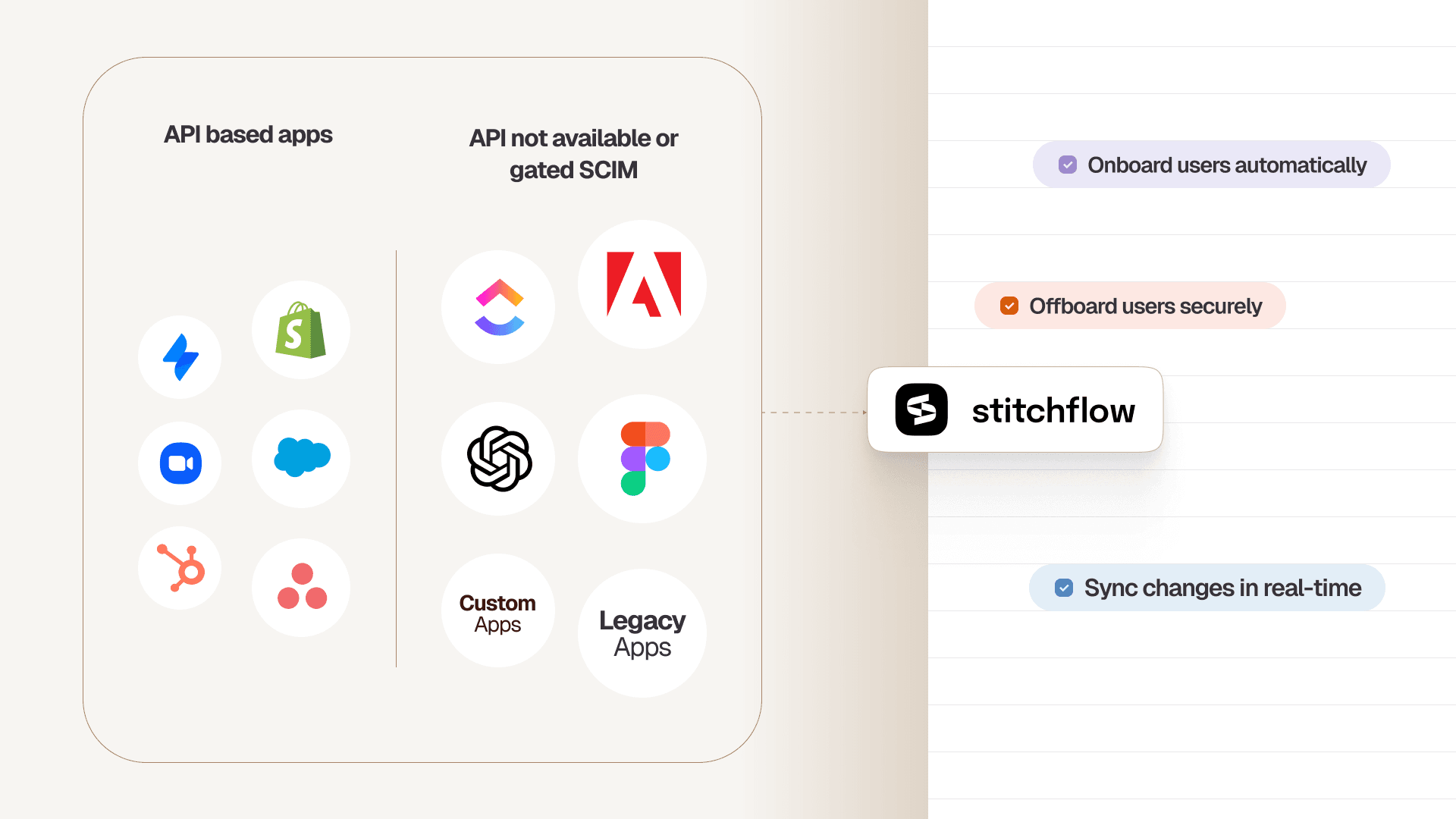
🎯Pro tip: For these "disconnected" apps that your IdP can't see, the only solution is to automate the manual admin work.
Stitchflow uses resilient browser automation, backed by a 24/7 human-in-the-loop (HITL) team, to perform deprovisioning actions just as a human would.
This allows you to automate vendor offboarding for any app with a web UI, effectively giving you SCIM capabilities without paying the "SCIM tax" for an enterprise plan.
Unlock SCIM for any app without the enterprise upgrade
Trigger automated provisioning in your IdP just like native SCIM. Enabled by resilient browser automation, backed by 24/7 human monitoring, at a fraction of the enterprise plan cost.
📋Passwords and shared credentials
Vendors may have service accounts, admin logins, or emergency accounts created during incidents. These often sit outside your identity system, so automated deprovisioning won’t catch them.
Some vendors also connect through their own identity provider using SSO. In that case, you need to shut down the integration on both ends. Disabling their local account in your system isn’t enough, because they can still authenticate through their own provider.
📋VPN and network access
Check if the vendor has direct network connections into your systems, like VPN tunnels, cloud-to-cloud links, or private circuits. These connections often bypass the usual app-level controls and may have been set up by your network team without IT security tracking them.
⚠️ Consider physical access: Vendors may still have building badges, server room access, or co-location keys. Work with facilities to collect cards and deactivate permissions.
Data retrieval and knowledge transfer
Data retrieval is usually the most urgent part of vendor offboarding. Once you cut access, it’s harder to get information back. Vendors may become less cooperative, and simple exports can turn into long negotiations.
📋Export critical data first
Retrieve all essential data before cutting access. This includes primary datasets, processed reports, analytics, and anything the vendor generated. Also, copy operational documentation you’ll need for transitions or troubleshooting later. This can be strategy notes, configuration guides, or custom scripts.
⚠️IP handover: Make sure all intellectual property created or modified by the vendor is formally returned.
📋Document processes and transfer credentials
Transfer any vendor-managed passwords, service accounts, or credentials to your internal team. Note system dependencies and document any workarounds or customizations they put in place. This could also be a good time to conduct exit interviews with vendors—show your gratitude and plan for what’s next.
⚠️Check automation platforms like Zapier or Microsoft Power Automate for vendor-related workflows that need updating.
📋Clean up internal records
Remove vendor information from internal databases, contact lists, and system documentation. Adjust for any dependencies their departure creates and update processes to show who is now responsible.
📋Update compliance reports
Document what data was retrieved versus what stays in vendor systems. Update your compliance documentation to reflect new data locations and ensure audit trails remain intact for regulatory requirements.
💡Vendor data deletion certificates: Don’t just trust vendors to delete your data. Get written proof that all residual data in their systems, backups, dev environments, and partner systems has been destroyed. Include the deletion method and completion date. This protects you legally if data leaks happen later.
Financial and contractual closure
Vendor relationships often end with surprise bills, forgotten auto-renewals, or credits that disappear if you don't claim them quickly. Financial loose ends can drag on for months and create ongoing liability even after you think the relationship is over.
📋Clear outstanding payments
Process final invoices promptly, but verify charges against your records first. Vendors may include unexpected fees like data export costs, early termination penalties, or cleanup charges not clearly disclosed.
Ask for itemized invoices and challenge any charges that seem incorrect or weren’t part of the original agreement.
📋Recover unused assets
Claim any unused software licenses, service credits, or prepaid balances before they expire. Look for partially used annual licenses or cloud credits that can be transferred to other accounts.
📋Stop future charges
Cancel auto-renewals and recurring billing right after sending the formal termination notice. Update procurement records and alert finance about upcoming subscription expirations. Some vendors require multiple confirmations or specific notification methods, so follow the process carefully.
📋Final contract reconciliation
Check your contract for any survival clauses that stay active after termination, such as audit rights, indemnification terms, or ongoing data protection responsibilities. Address these during closure to avoid future liability.
🎯Pro tip: Keep detailed records of all termination communications, payment confirmations, and final reconciliation documents. Vendor billing disputes often surface months later, and having complete documentation makes resolution much faster and cheaper.
Legal compliance and audit documentation
Incomplete records during vendor offboarding can create costly legal problems later. Audits, contract disputes, or breach investigations often happen months after termination—when key staff have moved on.
📋Follow regulations
Meet industry-specific requirements like GDPR data deletion timelines, HIPAA business associate termination procedures, or SOX rules for financial systems. Each regulation has its own notification periods, documentation needs, and deletion procedures. Missing them can trigger compliance violations long after the vendor relationship ends.
📋Document every step
Keep a full record of what was done, when, and by whom. Include termination notices, access removal confirmations, data deletion certificates, and final payment records. Auditors and legal teams rely on this trail to confirm proper procedures were followed.
🎯Pro tip: Archive all offboarding documentation in a secure, searchable system with retention schedules that match your legal requirements.
Post-offboarding review
Offboarding doesn’t end when access is revoked. Problems can appear weeks or months later. Forgotten integrations fail, leftover access shows up, or vendors act out. A structured follow-up catches these issues early.
📋Conduct internal reviews
Ask all teams involved for feedback. What went smoothly? What took longer than expected? Which access points were hardest to find? Use these insights to improve your offboarding process and spot gaps in your current approach.
📋Update policies and procedures
Document lessons learned and revise your vendor management policies. Add checks for any new types of access you discovered. Update risk assessments and onboarding processes to prevent similar issues in future offboarding.
📋Monitor for leftover access
Watch systems for several weeks after termination. Check logs for failed vendor logins, monitor system performance for broken integrations, and note user complaints that could indicate missing functionality.
🎯Pro tip: Set a 30-60-90 day follow-up schedule with checkpoints for system health, user feedback, and security. This ensures nothing is overlooked in the critical post-offboarding period.
👉 Download the free vendor offboarding checklist template as a PDF, customize it, and share it with your team.
Automate 100% of Vendor Offboarding with Stitchflow
Vendor offboarding fails when IT is forced to run manual, error-prone checklists for every app that isn't connected to their IdP.
This "automation gap"—which exists for apps without APIs or those locking SCIM behind an expensive "SCIM tax"—is precisely where security risks like orphaned accounts and lingering access are born.
Stitchflow closes this gap. We provide a managed SCIM bridge for any app with a web UI, allowing you to automate (de)provisioning for 100% of your apps, not just the easy ones.
We accomplish this by solving the single biggest challenge of browser automation: reliability.
Stitchflow’s platform combines deterministic, headless browser automation with a 24/7 human-in-the-loop (HITL) reliability layer.
While brittle, do-it-yourself scripts break with the smallest UI change, our on-call engineers are immediately alerted to handle any anomaly—like a UI change, a new CAPTCHA, or an MFA prompt—to ensure your vendor offboarding workflow never stops.
This approach integrates your entire tech stack, not just the easy parts:
- Plug Into Your IdP: Our automations act as a SCIM bridge or API endpoint. An offboarding action in your IdP (like Okta, Entra, or Sailpoint) can now finally trigger deprovisioning in all your "manual" apps, giving you 100% coverage.
- Automate Your ITSM: Your ITSM platform (like Zendesk or Jira) can trigger a real, automated action in a non-SCIM app via Stitchflow's API. That "manual offboarding" ticket can now close itself.
- Get Auditable Proof for GRC (Vanta, ServiceNow): Instead of just tracking checklists, your GRC tools can pull a full audit trail—including video recordings, logs, and timestamps—from Stitchflow for every single vendor app.
- Automate Any App: Securely provision and deprovision any application, whether it has an API, no API, or is a legacy, homegrown tool.
- Avoid the "SCIM Tax": Stop overpaying for enterprise plans just to get SCIM. Stitchflow provides the same automation capabilities at a fraction of the cost, saving you 20%+ on SaaS spend.
Pay Only After We Deliver. We'll build and test the automations for your most painful "disconnected" apps. You pay nothing until you've tested the integration and confirmed it works.
Frequently asked questions
The standard vendor offboarding workflow involves five key phases: pre-planning, formal notification, access removal, data transfer, and post-termination review. The process typically takes 2-8 weeks, depending on vendor complexity and integration depth.

Head of Marketing, Stitchflow
Sanjeev NC started his career in IT service desk and moved to ITSM process consulting, where he has led award-winning ITSM tool implementations. Sanjeev was also a highly commended finalist for Young ITSM Professional of the Year in itSMF UK’s annual awards.