
For years, BetterCloud was the default answer to "How do we manage our SaaS?" It defined the category of SaaSOps, offering a powerful command center for IT teams to automate onboarding, enforce file security, and manage Google Workspace at scale.
If you were a growing company with a heavy Google Workspace footprint, it was the standard choice.
However, for many IT teams in 2026, the reality of using BetterCloud has drifted from that initial promise.
The primary friction driving teams away is the "Integration Gap." BetterCloud was built on the premise of deep API connections. It excels at managing the "Big SaaS" platforms—Salesforce, Slack, Zoom, and the major identity providers—where official APIs are mature and readily available.
But modern SaaS stacks are fragmented, often containing dozens of niche marketing tools, legacy HR portals, and vertical-specific applications that lack public APIs or SCIM support.
Because BetterCloud relies almost entirely on these official integrations, it leaves a significant blind spot.
IT teams frequently find themselves in a paradoxical situation: paying a premium for an enterprise automation platform, yet still maintaining manual spreadsheets and logging into admin portals by hand to offboard users from the 30–40% of apps that BetterCloud cannot touch.
Beyond the technical limitations, the administrative burden has grown. Following its majority investment by Vista Equity Partners in 2022, users have increasingly cited rigid pricing structures and a decline in support quality as major frustrations.
The complex implementation process—often taking months to fully configure—makes it difficult for lean teams to realize quick value.
This has led to a shift in the market. Rather than settling for a single, expensive platform that leaves the "last mile" of SaaS management unfinished, IT leaders are moving toward specialized alternatives.
These modern solutions focus on closing the automation gap for disconnected apps, providing clearer visibility into spend, or offering lightweight, agile deployment.
Why IT teams are leaving BetterCloud
If you are reading this, you likely already feel the friction. You bought BetterCloud to be the "single pane of glass" for your SaaS stack, but you’ve realized that the glass has cracks.
However, the reality of using the platform often falls short of the initial promise. As SaaS stacks have exploded in complexity, BetterCloud’s rigid architecture has created operational blind spots that leave IT teams stuck with the exact manual work they were paying to eliminate.
Based on the feedback from G2, Reddit, and Gartner Peer Insights, here are the three main reasons IT leaders are moving on.
1. It leaves you with manual work for apps without APIs
This is the single biggest technical pain point. BetterCloud is built entirely on official APIs (SCIM). If an app doesn’t have an enterprise-grade API—which is true for roughly 40% of the average stack, including many marketing tools and legacy portals—BetterCloud simply cannot touch it.
This puts IT teams in a frustrating position: you are paying for a premium automation platform, yet your team is still manually logging into admin panels to offboard users from the "unsupported" apps one by one.
"BetterCloud is a great choice if you don't have the time and just want a few clicks to start automating stuff [for Google/Okta]. My only gripe with them is they're extremely expensive and are priced based on the number of integrations you want. We declined a proposal from them... and gave us access to all of their app integrations."
— u/thedonutman via r/ITManagers
2. Support quality and contract flexibility have declined
Since Vista Equity Partners acquired a majority stake in 2022, a common pattern has emerged in user reviews: prices are increasing while the quality of service is decreasing.
Long-time customers have noted that the "white-glove" support they once relied on has been replaced by slower response times and rigid renewal negotiations. For teams that need agility, this bureaucratic slowdown is a major friction point.
"I would never do business with Bettercloud again, evergreen clauses are gross and should be unenforceable!"
— u/ionet via Reddit (r/sysadmin)
"We currently use BetterCloud... If you're a Google company and your company has the money to throw around it's probably worth it. If you're expecting to be able to do complex automations you'll probably be disappointed."
— u/ping_localhost via r/sysadmin
3. It is expensive and takes too long to set up
BetterCloud is a heavy, enterprise-grade platform, and it carries the price tag and complexity to match. G2 data indicates that implementation often takes roughly two months, with some teams spending even longer to configure complex workflows.
For lean IT teams, this heavy lift destroys ROI. They are increasingly looking for tools that are lighter, faster to deploy, and don't force them to pay for bundled features they never use.
"BetterCloud is great for automation, but pricey if you're not using all the modules... [it] felt like overkill for what we needed."
— u/Crafty_Assignment686 via Reddit (r/ITManagers)
11 Best BetterCloud Alternatives and Competitors in 2026
Here are the top BetterCloud alternatives for 2026, categorized by the specific operational problems they solve.
| Platform | Best for | Standout feature | G2 rating |
|---|---|---|---|
| Stitchflow | IT teams needing to automate provisioning for non-SCIM apps and avoid the "SCIM Tax" | Resilient Browser Automation (automates any app without an API, backed by human-in-the-loop reliability) | 4.8/5 |
| Torii | Ops and IT teams building scalable SaaS workflows and decentralized shadow IT detection | Browser Extension Discovery that detects unmanaged apps at the browser level, capturing shadow IT missed by API scans. | 4.5/5 |
| Zluri | Mid-market teams wanting a balance of SaaS spend management and lightweight access reviews | 9-Method Discovery Engine combining desktop agents, firewall logs, and extensions for deep visibility. | 4.6/5 |
| Zylo | Finance and procurement teams focused on SaaS cost control and vendor management | AI-Powered Expense Discovery that ingests data from Concur/Expensify to find software spend hidden in expense reports. | 4.8/5 |
| Productiv | Data-driven teams needing "feature-level" usage stats to negotiate enterprise contracts | SaaS Intelligence™ that tracks deep engagement metrics (e.g., "Zoom meetings hosted" vs. just "logged in"). | 4.6/5 |
| CloudEagle | Lean finance teams who want to outsource vendor negotiations and guarantee savings | Negotiation-as-a-Service where expert negotiators handle renewals for you to secure guaranteed discounts. | 4.7/5 |
| Trelica | IT teams that want to automate workflows while keeping humans in the loop (e.g., Slack approvals) | Contextual Workflows that ask users "do you still need this?" via Slack before automatically removing access. | 4.8/5 |
| Lumos | Security teams wanting to reduce helpdesk tickets via self-service access requests | The "AppStore" & JIT Access portal allows employees to request temporary, time-bound access to sensitive tools. | 4.7/5 |
| SailPoint | Enterprises managing complex on-prem + cloud environments with strict audit needs (SOX) | Automated Access Certifications that act as the industry gold standard for complex governance and compliance reviews. | 4.5/5 |
| Okta | Existing Okta shops wanting to add governance without buying a separate tool | Okta Workflows, a no-code automation platform that triggers logic based on Identity lifecycle events. | 4.5/5 |
| JumpCloud | Startups and MSPs needing to replace Active Directory, LDAP, and MDM in one go | Open Directory Platform that unifies Identity (SSO), Device Management (MDM), and Directory (AD) in one console. | 4.5/5 |
1. Stitchflow
BetterCloud and traditional IGA platforms excel at managing the "Big SaaS" applications that offer robust, open APIs.
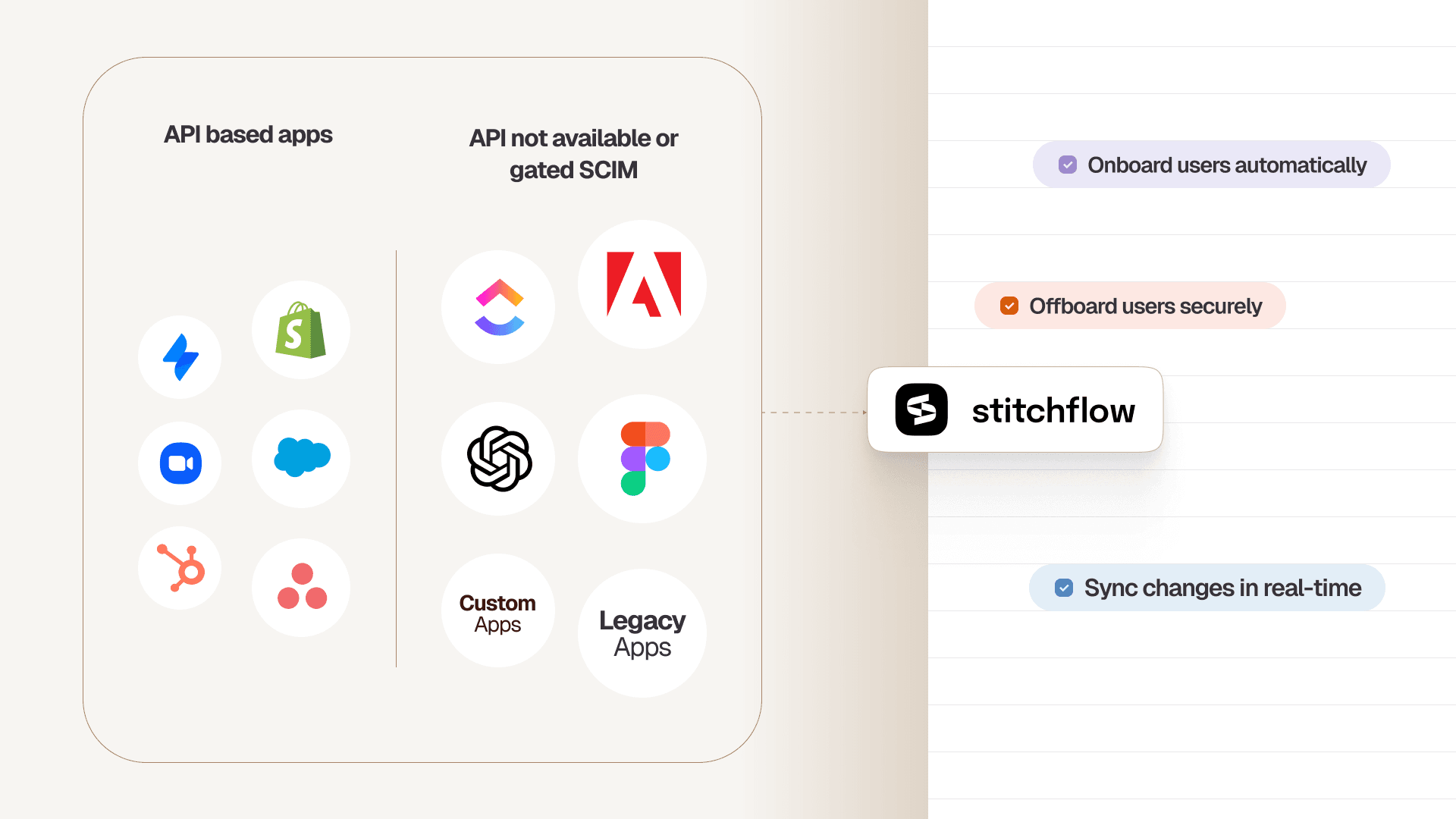
However, they hit a hard wall with the 30–40% of your app stack that lacks SCIM or hides it behind an expensive "Enterprise" paywall (the "SCIM Tax"). When BetterCloud cannot reach an app, your team is forced back into manual spreadsheets and browser clicks.
Stitchflow is built specifically to close this gap. It does not replace your IdP; it acts as the "Last Mile" infrastructure that extends your Identity Provider's reach into the disconnected applications that APIs cannot touch.
By turning the manual actions of a human administrator into a reliable, automated infrastructure, Stitchflow ensures that "100% offboarding" means exactly that—not just "100% of the apps with APIs."
The Core Difference
Stitchflow does not rely on vendor cooperation or existing APIs. Instead, it uses Resilient Browser Automation to interact directly with an application's admin console, effectively creating a "Synthetic API" for tools that don't have one.
Turning Admin UIs into Structured APIs
To your existing workflows in Okta, Entra ID, or even BetterCloud, Stitchflow behaves exactly like a standard API integration.
You send a standard deprovisioning signal (e.g., "Remove User"), and Stitchflow translates that signal into the precise sequence of browser clicks and keystrokes required to execute it in the target app.
This allows you to treat legacy portals and "Pro" tier SaaS apps as first-class citizens in your automation strategy.
Managed Maintenance, Not "Do-It-Yourself" Scripting
Unlike building internal scripts which are brittle and break whenever a vendor updates their UI, Stitchflow is a fully managed service.
Stitchflow’s engineering team builds and maintains the integrations for you. If a button moves or a workflow changes, Stitchflow updates the integration behind the scenes, ensuring your automation continues to run without your team needing to rewrite code.
Reliability via 24/7 Human-in-the-Loop (HITL)
The biggest risk with browser automation is fragility—CAPTCHAs, MFA prompts, or sudden UI changes can break a script. Stitchflow solves this with a 24/7 Human-in-the-Loop guarantee.
- Deterministic Execution: The system runs rigid, pre-validated scripts (not AI agents) to perform actions.
- Immediate Intervention: If the automation encounters a blocker like a CAPTCHA or MFA prompt, it pauses and alerts a 24/7 on-call engineering team. An engineer securely intervenes in a sandboxed environment to fix the blocker and resume the automation—typically within 15 minutes.
Defeating the "SCIM Tax"
A primary driver for IT teams seeking alternatives is the "SCIM Tax"—the practice where vendors like Adobe, Figma, and Slack gate basic provisioning features behind "Enterprise" plans that cost 200–400% more than their standard tiers.
- The BetterCloud Reality: To manage these apps, you often have to pay the vendor's ransom to unlock the API access that BetterCloud requires.
- The Stitchflow Reality: You stay on the "Pro" or "Team" plan. Stitchflow automates the admin console directly, giving you Enterprise-grade SCIM capabilities without the Enterprise-grade bill.
"Instead of charging $150 per user per month... you're saying, 'Hey, just give us five grand, and we'll do it for you for a year.' That’s beautiful."
— Kris Monier, Director of IT
Stand-out features
- The IT Graph: BetterCloud can only see access gaps in apps it is connected to via API. Stitchflow stitches together data from your IdP, HRIS, and disconnected apps (via CSV or browser automation) to create a unified "IT Graph".
It continuously runs logic checks to flag specific risks, such as "Active in Salesforce, Missing in Google" (Hidden Account) or "Licensed in Figma, No Login > 90 Days" (Wasted Spend), allowing you to remediate gaps that traditional tools can't even see. - Shadow AI Risk Profiling: While many tools discover shadow IT, Stitchflow specifically targets the explosion of unmanaged AI. It uses OAuth scanning to identify every tool employees have logged into using corporate credentials and assigns an AI Risk Score.
This allows IT to see not just what is being used (e.g., Fireflies.ai, ChatGPT), but how it is being used—tracking data retention policies and permission scopes to prioritize which tools need to be blocked or managed. - "Done-For-You" Integration Build: With BetterCloud, building complex workflows often falls on your internal IT team. Stitchflow operates as a managed service for integrations.
You don't write the scripts; Stitchflow’s engineers record your manual process, build the deterministic automation, and maintain it against UI changes. You buy the outcome (a provisioned user), not the tooling to build it yourself. - Unified User Directory: Most SaaS management tools only show you a roster of users from API-connected apps. Stitchflow creates a universal directory that includes users from legacy portals, internal admin panels, and non-SCIM apps alongside your Okta/Entra users.
This gives you a single, searchable view of every access point an employee has—whether it's managed via API, CSV, or browser automation—so you can instantly audit access for any user.
| Feature | BetterCloud | Stitchflow |
|---|---|---|
| Primary Goal | Deep policy enforcement, file security (DLP), and orchestration for major platforms (Google, M365, Slack). | Closing the "automation gap" by provisioning/deprovisioning apps that lack APIs or SCIM support. |
| Integration Tech | Relies entirely on vendor APIs. If an app lacks a public API (or gates it), BetterCloud cannot touch it. | Uses secure headless browsers to mimic human admins. Automates any web app via the UI, bypassing API limitations. |
| Handling Non-SCIM Apps | Can only create "tickets" or send emails telling a human admin to log in and remove the user manually. | Logs in and clicks the "Deactivate" button for you. Turns manual UI tasks into API-like automated workflows. |
| The "SCIM Tax" | Requires you to pay the SaaS vendor’s "Enterprise" markup (often +100-300%) to unlock the API needed for automation. | Automates standard/Pro plans directly through the browser. You get Enterprise automation on a "Team" plan budget. |
| Maintenance Model | You build and maintain the workflows. If an API changes or a workflow breaks, your internal team must debug it. | Managed service. Stitchflow builds the integrations, and a 24/7 human engineering team fixes them if they break (99.5% uptime). |
| Implementation | Enterprise implementation requires significant configuration, policy definition, and training. | We record your manual process once, build the script, and hand you a working "API" endpoint. Pay on delivery. |
| Pricing Model | Complex tiered pricing based on user count and modules. Often requires expensive bundles for full value. | Simple flat fee per app ($5,000/year). Automate only the specific apps that cause pain. No platform minimums. |
Case Study:
SpotOn, a fast-growing fintech leader, had a robust Okta implementation for their core apps but struggled with the "long tail" of disconnected SaaS tools. Their IT team was drowning in manual spreadsheets to track licenses for apps that lacked SCIM or were too expensive to upgrade to Enterprise plans.
- The Challenge: Renewal audits took two weeks of manual cross-referencing. Offboarding was a high-risk game of "did we catch everything?", leaving the company exposed to compliance gaps and wasted spend.
- The Solution: SpotOn deployed Stitchflow to unify their Okta data with their disconnected apps. Stitchflow’s automated gap analysis immediately flagged 400+ orphaned accounts that had slipped through manual checks.
- The Results:
- 98% Faster Audits: Renewal reviews dropped from 2 weeks to just 15 minutes.
- Immediate Savings: Identified and reclaimed $160,000+ in wasted annual SaaS spend.
- Zero-Touch Compliance: Closed 400+ security gaps (orphaned accounts) without adding headcount.
"We reviewed 7,000 accounts across multiple applications in just 15 minutes with all the context needed for quick decisions. Renewals no longer keep us up at night."
— Director of Enterprise Applications, SpotOn
Unlock SCIM for any app without the enterprise upgrade
Trigger automated provisioning in your IdP just like native SCIM. Enabled by resilient browser automation, backed by 24/7 human monitoring, at a fraction of the enterprise plan cost.
2. Torii
Torii is a Distributed SaaS Management Platform (SMP) that differentiates itself with a "discovery-first" approach.
Unlike BetterCloud, which relies heavily on API connections for visibility, Torii uses a multi-layered discovery engine—combining browser extensions, OS agents, and finance integrations—to find "Shadow IT" apps that employees sign up for without IT's knowledge.
It positions itself as an "open" platform, encouraging decentralized management where department heads (not just IT) can own their specific SaaS tools while IT maintains governance.
Best for: Fast-growing, distributed companies that prioritize Shadow IT visibility and want to decentralize SaaS ownership to department heads.
G2 rating: 4.5/5
Torii standout features
- Shadow IT Discovery: Uses a browser extension and desktop agent to detect unsanctioned apps that API-only tools miss (e.g., a user signing up for a PDF editor with a corporate email).
- Decentralized Application Ownership: Allows IT to assign "App Owners" (e.g., the VP of Sales owns Salesforce), giving them permissions to manage licenses and renewals for their specific stack.
- Visual Workflow Builder: A "Canvas" style automation builder that is generally considered more intuitive and flexible than BetterCloud’s linear workflow editor.
- AI Contract Ingestion: Automatically parses PDF contracts to extract renewal dates, license counts, and costs, reducing manual data entry for spend management.
Torii pros
- Superior Visibility: Because it ingests data from finance systems (Expensify, NetSuite) and browser extensions, it finds significantly more apps than tools relying solely on OAuth/SSO.
- User Experience: Consistently rated higher than BetterCloud for "Ease of Use" and setup speed, often implementing in weeks rather than months.
- Open Ecosystem: Offers an open API and developer community, allowing teams to build custom integrations more easily than BetterCloud’s closed ecosystem.
Torii cons
- Browser Extension Dependency: To get the full value of its discovery features, you must deploy an endpoint agent or browser extension to every employee device, which can face pushback from privacy-conscious cultures or security teams.
- Limited "Deep" Automation: While great for discovery, users report that its remediation actions (like complex deprovisioning sequences) can be less granular than BetterCloud’s mature API controls for platforms like Google Workspace.
- Reporting Depth: Advanced reporting and analytics can lack the depth found in enterprise-focused tools, requiring manual manipulation for complex audits.
3. Zluri
Zluri is a "Discovery-First" SaaS Management Platform that differentiates itself by combining standard spend management with lightweight Identity Governance (IGA) features. It uses a patented "9-method discovery engine"—ranging from desktop agents to financial integrations—to build a comprehensive view of Shadow IT, and then layers on access reviews and lifecycle automation to manage what it finds.
Best for: Mid-market IT teams who want to combine SaaS Management (SMP) with basic Identity Governance (Access Reviews) in a single platform.
G2 rating: 4.6/5
Zluri standout features
- Patented Discovery Engine: Uses nine different data sources (including browser extensions, desktop agents, and firewall logs) to uncover Shadow IT with higher accuracy than API-only tools.
- Identity Governance (IGA) Lite: Unlike most SMPs, Zluri includes built-in "Access Reviews," allowing IT to run compliance campaigns (e.g., "Quarterly User Access Review") directly within the tool.
- Employee App Store: A self-service portal where employees can request licenses for approved apps, automating the approval workflow via Slack or Microsoft Teams.
- Lifecycle Automation: A workflow builder that automates onboarding and offboarding tasks, similar to BetterCloud but with a wider library of "long-tail" integrations.
Zluri pros
- Deep Visibility: Because it uses desktop agents and browser extensions, it offers deeper visibility into actual usage (e.g., "active time on screen") compared to tools that only look at "last login" dates via SSO.
- Governance Focus: It bridges the gap between a finance tool and a security tool. If you need to satisfy auditors with access certification reports but can't afford a full SailPoint implementation, Zluri is a strong middle ground.
- Responsive Support: Users consistently rate their customer success team highly for helping build custom workflows during implementation.
Zluri cons
- Integration Depth vs. Breadth: While they boast 800+ integrations, users note that many are "read-only" or shallow. You may see the data, but you often cannot take action (provision/deprovision) without building custom API calls.
- Still Subject to the "SCIM Tax": Like BetterCloud, Zluri’s provisioning relies on official APIs. If an app locks its API behind an Enterprise plan (e.g., Asana, Calendly), Zluri cannot automate it unless you pay the vendor's upgrade fee.
- Agent Fatigue: Deploying their desktop agents and browser extensions to get full visibility can be operationally heavy and may face resistance from employees concerned about privacy.
4. Zylo
Zylo is the "System of Record" for Enterprise SaaS Spend. While other tools focus on automating user access (ITOps), Zylo focuses on the financial side of the house. It is widely considered the gold standard for large enterprises (like Adobe and Salesforce) that need to track millions in SaaS spend across thousands of employees. It shines at identifying "Shadow Spend" by ingesting data directly from expense management systems (like Concur and Expensify) to find software purchased on corporate credit cards.
Best for: Enterprise Procurement and Finance teams who need a "SaaS Sub-Ledger" to find and cut wasted spend across a massive portfolio.
G2 rating: 4.8/5
Zylo standout features
- AI-Powered Spend Discovery: Ingests data from Accounts Payable and Expense systems (Concur, Coupa, Netsuite) to identify software purchases hidden in expense reports (e.g., an employee expensing a $15/month tool as "Travel").
- The "Zybrary": A massive database of 20,000+ SaaS applications and benchmarks. It allows you to benchmark your pricing against what peer companies are paying for the same tool (e.g., "Am I paying too much for Zoom compared to other 5,000-person companies?").
- License Reclamation Workflows: Automated emails that ask employees, "Are you still using this?" If they say no (or don't reply), Zylo can automatically downgrade or deprovision the license to save costs.
- SaaS Negotiator Services: Unlike pure software vendors, Zylo offers a "Managed Service" where their team of negotiators will actually handle your SaaS renewals for you to guarantee savings.
Zylo pros
- Best-in-Class Discovery: Because it follows the money (expense reports) rather than just the login (SSO), it finds shadow SaaS that every other tool misses.
- ROI Focused: It is built to save money. The "Savings Dashboard" explicitly tracks hard dollars saved through license reclamation and contract negotiation, making it easy to prove value to a CFO.
- Enterprise Maturity: Trusted by massive orgs (Adobe, Intuit, Salesforce), so it has the granular RBAC and reporting features that Fortune 500 teams require.
Zylo cons
- Less Focus on "IT Ops" Automation: While great at identifying what to cut, its actual operational automation (e.g., complex onboarding/offboarding workflows) is less robust than BetterCloud or Stitchflow. It is a finance tool first, IT tool second.
- Implementation Heavy: Getting full value requires deep integrations with your financial systems (ERPs), which can be a slow and political process involving Finance/Procurement stakeholders.
- Pricing: Generally targeted at the enterprise, with a price tag to match. It is often overkill (and over-budget) for mid-market teams just looking to automate onboarding.
5. Productiv
Productiv positions itself not just as a management tool, but as a "SaaS Intelligence" platform. While traditional tools look at basic login data (SSO) to see if a license is being used, Productiv goes deeper into "Engagement Analytics." It connects directly to app APIs to tell you how a tool is being used—for example, distinguishing between a user who logs into Zoom once a month versus one who hosts five meetings a week. This granularity helps IT and Procurement teams make data-backed decisions during renewal negotiations.
Best for: Data-driven Procurement and IT teams who need deep "feature-level" usage data to rationalize licenses and negotiate enterprise contracts.
G2 rating: 4.6/5
Productiv standout features
- SaaS Intelligence™: Moves beyond "last login" dates to track actual engagement metrics (e.g., "Files Shared" in Box or "Meetings Hosted" in Zoom), allowing for smarter license tiering.
- Shadow AI Visibility: Specifically scans for AI tools and "Shadow AI" usage, giving IT visibility into which LLMs or generative tools employees are feeding corporate data into.
- App Procurement Workflows: Offers a dedicated "App Store" experience where employees can request software, and the workflow automatically routes approvals to Finance, Security, and Legal based on the tool’s risk profile and cost.
- Benchmark Data: Provides comparative benchmarks on pricing and usage, helping teams understand if they are overpaying or under-adopting a tool compared to industry peers.
Productiv pros
- Depth of Data: It arguably offers the deepest usage analytics in the market. Knowing that a user has a Salesforce license but hasn't updated an Opportunity in 90 days allows you to confidently downgrade them to a "Read-Only" seat.
- Procurement Alignment: Bridges the gap between IT and Finance better than most tools by translating technical usage data into financial renewal strategies.
- User Experience: Highly rated for its clean UI and "App Store" interface, which improves the employee experience for requesting new tools.
Productiv cons
- Limited Operational Automation: While excellent for analyzing data, it is less robust than BetterCloud or Stitchflow when it comes to acting on it. It is primarily an analytics and workflow tool, not a deep provisioning/deprovisioning engine for complex edge cases.
- Implementation Speed: Because it relies on deep API connections to get that granular data, setting up the full "Intelligence" suite can take longer than lighter discovery-only tools.
- Cost: Positioned as a premium enterprise solution, its pricing reflects the depth of intelligence it provides, often making it too expensive for mid-market teams just needing basic offboarding.
6. CloudEagle
CloudEagle is a SaaS Procurement and Management platform that heavily focuses on the "Assisted Buying" use case. While it offers standard discovery and license management features, its standout value proposition is its "Vendor Research & Negotiation" module. It uses AI to recommend vendors based on your requirements and offers a "Negotiation-as-a-Service" team that will negotiate contracts on your behalf to guarantee savings.
Best for: Finance and Procurement teams who want to outsource vendor negotiations and guarantee hard dollar savings on SaaS contracts.
G2 rating: 4.7/5
CloudEagle standout features
- Assisted Buying & Negotiation Services: CloudEagle provides a team of expert negotiators who use benchmark data to negotiate better terms with vendors on your behalf, often promising guaranteed savings.
- AI-Powered Vendor Recommendations: An "App Store" like experience where stakeholders can input requirements (e.g., "I need a project management tool"), and the AI recommends the best-fit vendors based on peer reviews and feature matching.
- Slack-Based Procurement Workflows: Allows employees to request software directly from Slack, triggering an automated approval chain that routes to Finance, IT, and Legal without leaving the chat interface.
- Contract Renewal Intelligence: Automatically extracts renewal dates and terms from contracts and alerts you 90 days in advance, providing "Price Benchmarks" to show if you are paying more than similar companies.
CloudEagle pros
- Hard ROI Guarantee: They are one of the few vendors that often market a "guaranteed savings" model, where the tool pays for itself through the discounts their negotiation team secures.
- Procurement Efficiency: The combination of AI vendor matching and Slack-based approvals significantly speeds up the "Intake-to-Procure" cycle compared to manual email threads.
- Good for Lean Teams: For companies without a dedicated procurement manager, CloudEagle effectively acts as an outsourced procurement department.
CloudEagle cons
- Less "IT Admin" Depth: While it handles provisioning, its capabilities in deep IT operations (like complex offboarding sequences or transferring data ownership) are less mature than IT-focused tools like BetterCloud.
- Learning Curve: Some users report that the platform's extensive feature set (combining finance, procurement, and IT) can have a steeper learning curve for new admins compared to simpler tools.
- Setup Complexity: Getting the full value of the "savings" engine requires deep integration with financial systems and uploading all historical contracts, which can be a heavy initial lift.
7. Trelica
Trelica helps IT teams move from "Command and Control" to "Collaborative Governance." While BetterCloud attempts to centralize all power within IT, Trelica acknowledges that in a modern company, department heads (Sales, Marketing, Engineering) often buy and manage their own software. It provides a platform where IT can monitor risk and spend, while empowering business unit leaders to handle day-to-day license approvals and renewals for their specific tools.
Best for: IT & Procurement teams who want to decentralize SaaS management by partnering with business stakeholders (e.g., letting the VP of Sales manage Salesforce licenses).
G2 rating: 4.8/5
Trelica standout features
- Contextual Workflows: Unlike rigid linear automations, Trelica’s workflows are designed for human-in-the-loop interactions. For example, before deprovisioning a license, it can automatically Slack the user’s manager to ask, "Do you need to transfer this user's data?" and route the action based on the reply.
- App Hub (Employee App Store): A self-service portal where employees can discover approved tools and request access. It automates the approval routing to the correct "App Owner" (not always IT) and then provisions the license upon approval.
- Shadow IT Discovery via OAuth: continuously scans Google Workspace and Microsoft 365 for OAuth tokens, identifying which third-party apps have been granted access to corporate data (e.g., a "Read Mail" permission granted to an unapproved AI tool).
- Renewal Management: A consolidated calendar that alerts both IT and the assigned business owner well in advance of contract renewals, often integrating with finance data to show actual vs. committed spend.
Trelica pros
- User Experience (UX): Consistently rated as the most intuitive interface in the category. Users frequently describe it as "a joy to use" compared to the clunky, legacy feel of older enterprise platforms.
- Customer Support: Holds one of the highest support ratings in the industry (9.8/10 on G2), with users citing direct access to engineers who understand the product deeply.
- Pricing Transparency: Generally more affordable and flexible than BetterCloud, with a willingness to share transparent pricing models rather than hiding behind opaque enterprise quotes.
Trelica cons
- Reporting Depth: While great for operational workflows, some power users find its custom reporting and analytics capabilities less granular than data-heavy tools like Productiv or Zylo.
- SCIM/API Dependency: Like BetterCloud, its automated provisioning relies on official vendor APIs. If an app (like Adobe or Figma) puts its API behind an expensive Enterprise paywall, Trelica cannot automate it without that upgrade.
- Smaller Ecosystem: As a newer player compared to BetterCloud, its library of pre-built "deep" integrations is smaller, though it covers the major platforms well.
8. Lumos
Lumos markets itself as the first "AppStore for Companies." It blurs the line between SaaS Management (SMP) and Identity Governance (IGA). While most tools focus on the admin's view (spreadsheets and charts), Lumos focuses on the employee experience. It provides a self-service portal where employees can "shop" for apps, triggering automated approval workflows that provision access for a specific duration (e.g., "Grant access to AWS for 4 hours").
Best for: Security-conscious companies that want to combine SaaS Management with Identity Governance (access reviews) and Privileged Access Management (PAM).
G2 rating: 4.7/5
Lumos standout features
- Self-Service AppStore: A user-friendly portal where employees can request software. It automates the "request → approval → provision" cycle via Slack, reducing IT helpdesk tickets.
- Just-in-Time (JIT) Access: Unlike standard SMPs, Lumos offers "PAM Lite" capabilities. You can grant temporary, time-bound access to sensitive tools (e.g., "Give admin access to GitHub for 2 hours"), which automatically revokes when the timer runs out.
- Automated Access Reviews: Streamlines compliance (SOX, ISO 27001) by generating access review campaigns. It uses AI to flag unused accounts and suggest revocations, replacing manual spreadsheet audits.
- Shadow IT Discovery: Connects to Okta, Google Workspace, and HRIS to map out who has access to what, identifying accounts that bypass SSO.
Lumos pros
- Employee Experience: It solves the "Shadow IT" problem by making the approved path easier than the shadow path. Employees love the "AppStore" experience compared to filing Jira tickets.
- Unified Governance: It consolidates three tools into one: SaaS Management (spend), IGA (compliance), and PAM (privileged access), reducing vendor sprawl for the IT team.
- Ease of Use: Consistently rated higher than legacy governance tools (like SailPoint) for ease of setup and administration.
Lumos cons
- Integration Depth: While strong on "Big SaaS" (Okta, Slack, AWS), users note that its library of deep integrations for niche apps is smaller than BetterCloud’s. For non-supported apps, it often falls back to ticketing workflows rather than direct provisioning.
- Cost: Because it combines IGA and PAM features, it is typically priced higher than a standalone SaaS Management or Spend tool.
- Complexity for "Just Spend": If your primary goal is simply "finding wasted spend," Lumos’s heavy focus on access governance and workflows might be overkill.
9. SailPoint
SailPoint is the market leader in Identity Governance and Administration (IGA). Unlike BetterCloud and other SMPs that focus on "SaaS Operations" (making IT's life easier), SailPoint focuses on "Identity Security" (keeping auditors happy). It is designed to answer the critical compliance question: "Who has access to what, and should they?" It excels in complex, hybrid environments where you need to manage access across modern SaaS apps, legacy on-premise systems (like SAP or Oracle), and cloud infrastructure all in one place.
Best for: Large enterprises with hybrid environments (On-prem + Cloud) that face strict regulatory compliance needs (SOX, HIPAA, GDPR).
G2 rating: 4.5/5
Sailpoint standout features
- Automated Access Certifications: The industry standard for compliance reviews. It automates the painful process of asking managers to review and approve their team's access rights, generating audit-proof reports.
- AI-Driven Identity Intelligence: Uses machine learning to peer-group analyze user access. It can flag "outlier" access (e.g., "Why does this one Marketing Manager have Admin access to AWS when no one else in Marketing does?").
- Hybrid Connectivity: Unlike API-only SaaS tools, SailPoint can connect to essentially anything—mainframes, Active Directory, custom on-prem apps, and modern SaaS—providing a true single view of identity.
- Segregation of Duties (SoD) Policies: Allows you to define complex rules to prevent toxic combinations of access (e.g., "A user cannot have both 'Create Vendor' and 'Pay Vendor' permissions").
SailPoint pros
- Compliance Powerhouse: If your primary pain is passing a SOX audit or managing complex entitlements for thousands of users, SailPoint is the gold standard.
- Depth of Control: It goes deeper than just "Assign License." It manages granular entitlements (roles, groups, permissions) inside applications better than almost any other tool.
- Vendor Agnostic: Because it is pure identity governance, it integrates well with other security tools (PAM, SIEM) without trying to replace them.
SailPoint cons
- Implementation Complexity: It is not a "plug-and-play" tool. Deployments often take 6+ months and frequently require expensive external consultants or "Expert Services" to configure correctly.
- High Total Cost of Ownership (TCO): Between licensing fees, implementation partners, and the dedicated internal headcount needed to run it, it is one of the most expensive options on the market.
- Overkill for "SaaS Management": If your goal is simply to find wasted SaaS spend or automate Slack onboarding, SailPoint is like using a sledgehammer to crack a nut. It lacks the direct "spend management" features of tools like Zylo or Productiv.
10. Okta
Okta is primarily an Identity Provider (IdP), the "front door" to your company's apps. However, with its Okta Identity Governance (OIG) and Workflows products, it is increasingly competing with SaaS Management Platforms. It attempts to be the "one-stop-shop" for identity, arguing that if you already use Okta for SSO, you should use it for governance and automation too.
Best for: Organizations already deeply invested in the Okta ecosystem who want to consolidate vendors by adding governance (IGA) and automation features to their existing identity contract.
G2 rating: 4.5/5
Okta standout features
- Okta Workflows: A powerful no-code automation platform (similar to Zapier but for identity) that lets you build complex logic like "If a user is added to the 'Engineering' group, provision Github, Slack, and Jira, and send a welcome email."
- Lifecycle Management (LCM): Automates the "Joiner, Mover, Leaver" process. When a user is deactivated in HR (like Workday), Okta automatically kills their access to all connected apps.
- Access Certifications: A governance module that allows managers to review and recertify their employees' access rights, helping meet compliance standards like SOX and ISO 27001 without needing a separate tool like SailPoint.
Okta pros
- The "Suite" Advantage: If you already use Okta for SSO, enabling Governance is just a licensing upgrade. It eliminates the need to integrate a third-party tool and sync data back and forth.
- Security First: As a security company, its policies (MFA, adaptive access) are world-class. You can enforce rules like "Deny access if the user is in a risky country" natively within the provisioning flow.
- Ecosystem: The "Okta Integration Network" is massive, meaning it has pre-built SCIM connectors for thousands of apps—if you are willing to pay for the app's Enterprise plan.
Okta cons
- The "SCIM Tax" Enforcer: Okta relies 100% on official SCIM APIs. It cannot provision an app if the vendor doesn't have a SCIM connector or if you haven't bought the vendor's Enterprise plan. It effectively enforces the SCIM tax rather than solving it.
- Pricing Complexity: Okta's pricing is modular. You pay separately for SSO, MFA, Lifecycle Management, and Workflows. Costs can balloon quickly as you add "advanced" features that come standard in other tools.
- No Spend Management: Unlike Zylo or Zluri, Okta has zero visibility into cost. It doesn't know if you're wasting money on unused licenses; it only knows if a user has a license.
10. JumpCloud
JumpCloud is an Open Directory Platform that unifies identity, access, and device management. While BetterCloud assumes you already have an Identity Provider (like Okta) and just manages the apps, JumpCloud is the Identity Provider (replacing Active Directory) and the Device Manager (MDM). It consolidates the entire "IT Stack in a Box" for mid-market companies, allowing you to manage a user's laptop (Mac/Windows/Linux), their Wi-Fi access (RADIUS), and their SaaS apps (SSO) from a single console.
Best for: Small to mid-sized IT teams (SMEs) and MSPs looking to replace Active Directory and consolidate Identity + Device Management (MDM) into one platform.
G2 rating: 4.5/5
JumpCloud standout features
- Cloud Directory: A cloud-native replacement for Microsoft Active Directory and LDAP. It acts as the single source of truth for user identities without needing on-prem servers.
- Cross-OS Device Management (MDM): unlike standard SaaS management tools, JumpCloud manages the actual hardware. You can enforce policies (e.g., "Encrypt Disk," "Disable USB") on macOS, Windows, and Linux devices.
- Cloud RADIUS: Built-in RADIUS servers allow you to secure office Wi-Fi and VPN access using the same user credentials, without setting up complex network infrastructure.
- User Lifecycle Automation: Automates provisioning/deprovisioning across your directory, devices, and SaaS apps simultaneously (e.g., "Disable user" locks their laptop and kills their SSO access).
JumpCloud pros
- The "All-in-One" Value: For a lean IT team, buying one tool that handles Identity (SSO), Devices (MDM), and Directory (AD) is significantly cheaper and simpler than buying Okta + Jamf + Active Directory separately.
- OS Agnostic: It treats Mac, Windows, and Linux as first-class citizens, making it ideal for mixed-device environments (e.g., engineering teams on Linux, sales on Mac).
- Free Tier: Offers a generous free tier (usually up to 10 users/devices), making it the de-facto standard for startups building their first IT stack.
JumpCloud cons
- Breadth vs. Depth: Because it does everything, it may not be as deep in any one area as a best-of-breed tool. For example, its "SaaS Management" features are basic compared to Zylo, and its MDM is less granular than Jamf.
- Limited SaaS "Ops" Automation: It excels at access (SSO), but lacks the deep API inspection of BetterCloud. It can't easily "scan Google Drive for credit card numbers" or "transfer Asana tasks upon termination" without custom scripting.
- Reporting: Advanced compliance reporting and logs can sometimes feel less robust than enterprise-grade governance tools like SailPoint.
Closing thoughts: Stop Paying the "Ransom" for Basic Automation
If you’ve read this far, you know the uncomfortable truth about modern IT: The "Happy Path" is a lie.
The vendors selling you "single pane of glass" solutions are selling you a fantasy where every app has a pristine API, every user fits neatly into an RBAC group, and you have an unlimited budget to pay for Enterprise upgrades.
But you live in the real world. The world of 20 browser tabs open 24/7.
The world of the "SCIM Tax"—where vendors like Adobe and Figma charge you a 300% markup just to automate provisioning. The world where 30% of your stack is "disconnected" because the API is missing, broken, or paywalled.
At Stitchflow, we believe automation is a right, not an upsell.
We didn’t build Stitchflow to replace your IdP. We function as the "Last Mile" infrastructure that bridges the gap between your Identity Provider (Okta, Entra) and the messy, disconnected apps they can't reach.
We do this through Resilient Browser Automation where we run secure, headless browsers inside a private GCP VPC to execute the exact actions a human admin would take.
But we know browser automation is brittle. That’s why we don’t just hand you a script and wish you luck.
We back every automation with a 24/7 Human-in-the-Loop (HITL) reliability layer. When a UI changes or a CAPTCHA appears, our on-call engineers intervene in a secure, sandboxed environment to restore the flow within 15 minutes.
You get the flexibility of a human admin with the security, auditability, and speed of an API.
Stop choosing between security and budget. Stop accepting that "manual provisioning" is just part of the job description.
You can’t automate what you can’t see, and you can’t be secure until you fix every gap. It’s time to close the loop on the last 30% of your stack.
Ready to defeat the SCIM Tax and automate the un-automatable?
Frequently asked questions
The primary driver is the "Integration Gap." BetterCloud excels at managing apps with official APIs (like Google Workspace and Slack), but it leaves a blind spot for the 30-40% of the stack that lacks SCIM or public APIs. Teams find themselves paying premium platform fees but still doing manual work for these "disconnected" apps. Additionally, users have reported frustration with rising costs, rigid "evergreen" renewal clauses, and declining support quality following BetterCloud’s acquisition.

Organic Growth Strategist, Stitchflow
Pravinan Sankar is fascinated by the chaos that happens when orgs try to manage hundreds of SaaS tools without losing their sanity. He creates content for IT teams who want fewer surprises in their workday. His approach blends data with storytelling because spreadsheets alone don't inspire action.